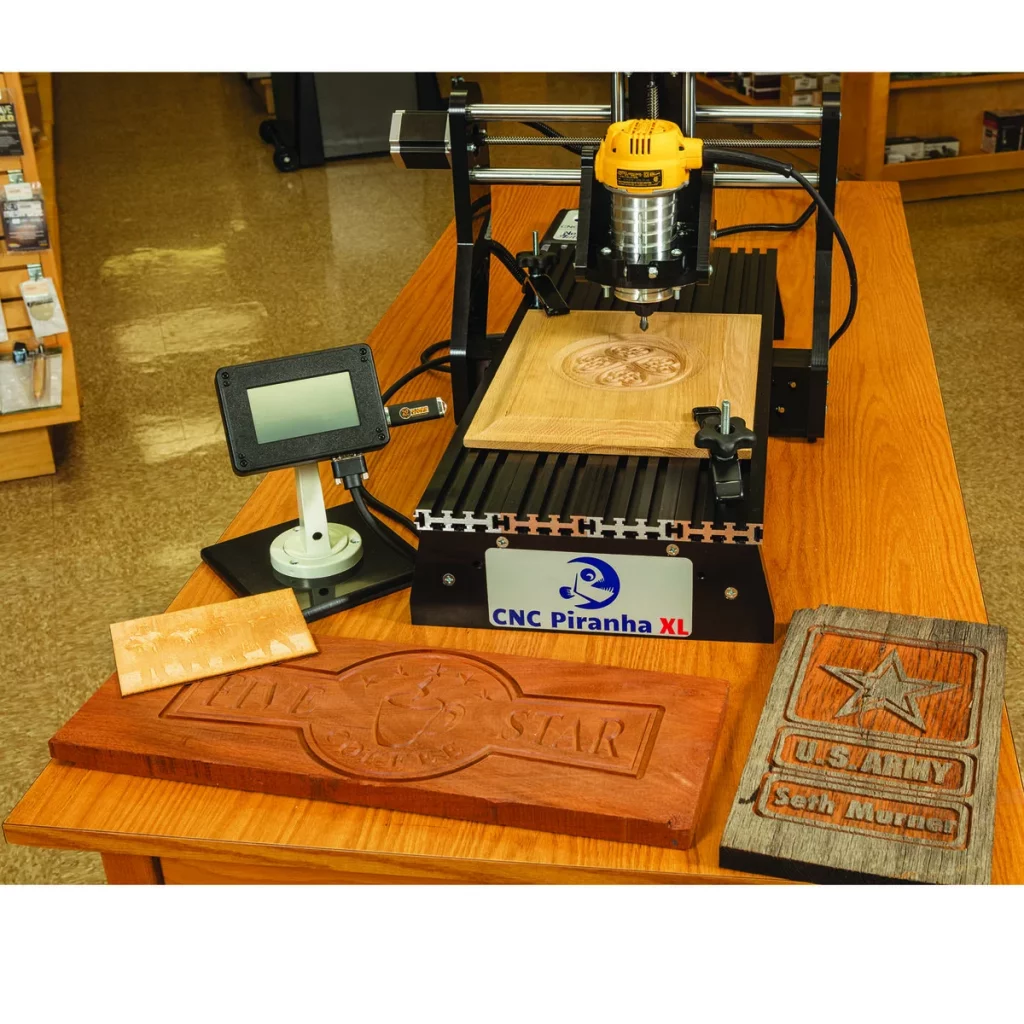
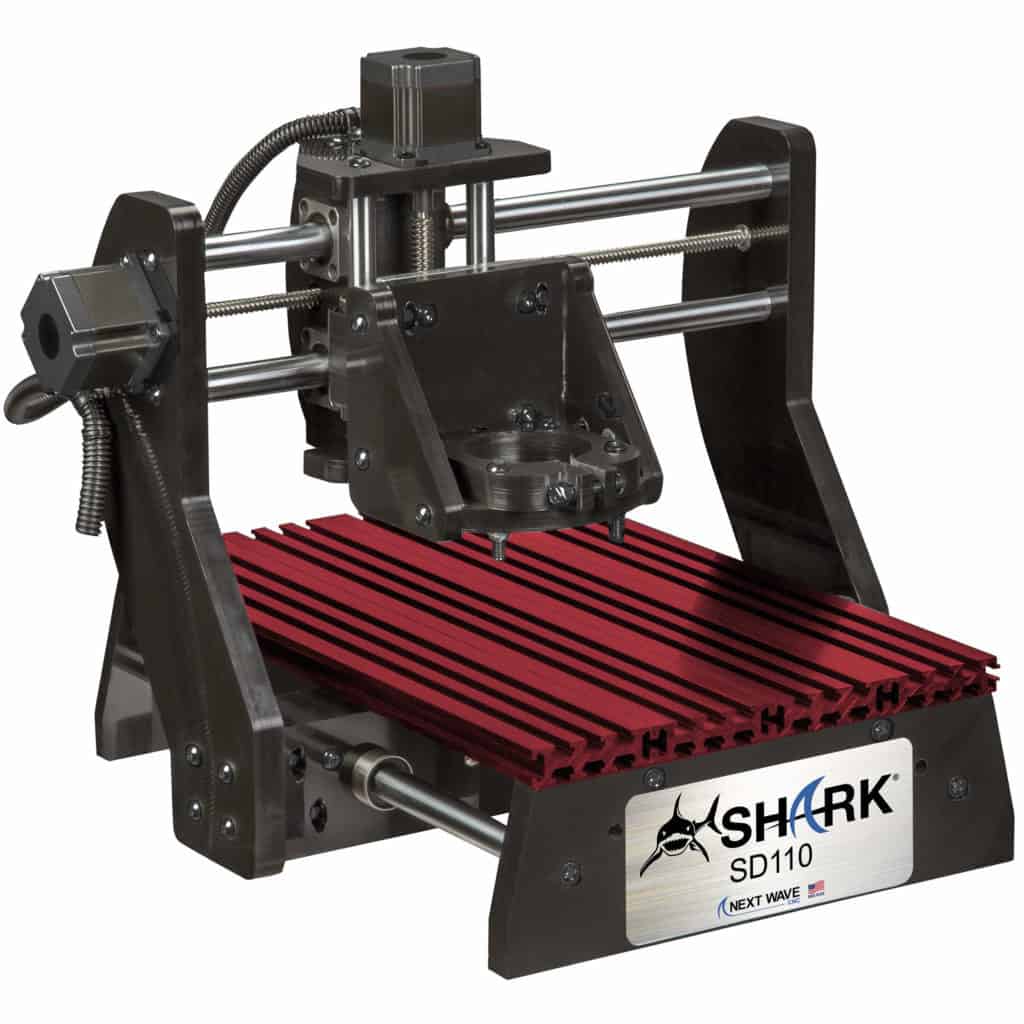
Side-by-side comparison

CNC Piranha XL vs SHARK SD110: Which Compact CNC Router Should You Buy?

Option A CNC Piranha XL
vs
Option B SHARK SD110: Which Compact CNC Router Should You Buy?
Read Full breakdown Jump Final verdict Browse More comparisons

How to use this comparison

CNC Piranha XL

Scan this side when you care about its standout strengths, trade-offs, price, and use-case fit.

SHARK SD110: Which Compact CNC Router Should You Buy?

Use this side to judge the alternative against the same decision points before reading the verdict.

The CNC Piranha XL and SHARK SD110 are both compact benchtop CNC routers from Next Wave, but they are not aimed at exactly the same buyer. The Piranha XL gives you more usable Y-axis travel, while the SHARK SD110 is the smaller, more compact desktop machine for plaques, boxes, engraving, and lighter hobby work.

The quick answer is this: choose the CNC Piranha XL if you need longer work capacity for signs, plaques, cabinet accents, longer boards, or repeated layout work. Choose the SHARK SD110 if you want a smaller-footprint CNC router for learning, carving, engraving, and small workshop projects.

The important thing is not just “which one is better.” The real question is whether your actual projects fit inside the machine’s usable travel. A CNC table can look roomy, but the cutter cannot always reach every inch of that table. That difference between table size, cutting area, and XYZ travel is where many first-time buyers get caught.

Best Choice at a Glance

Buyer NeedBetter ChoiceWhy
Small signs, plaques, and learning CNCSHARK SD110Compact footprint, simple pendant workflow, and enough travel for many beginner projects.
Longer plaques, longer boards, and larger decorative workCNC Piranha XLThe Piranha XL has much more Y-axis travel, which matters more than many beginners expect.
Small-shop CNC with limited bench spaceSHARK SD110Its overall footprint is easier to fit on a small bench.
Projects needing extra Z clearanceCNC Piranha XLThe Piranha XL has 4 inches of Z travel, compared with 3 inches on the SD110.
Best used-market valueDepends on conditionCheck controller, pendant, Vectric license, lead screws, backlash, and whether accessories are included.

CNC Piranha XL vs SHARK SD110: Main Difference

The biggest practical difference is usable travel. The Piranha XL is the longer machine. In the April 2018 CNC Piranha FX/XL manual, Next Wave lists the Piranha XL with a 12-inch x 30-inch work table and maximum cutter travel of 12 inches x 24 inches x 4 inches. The SHARK SD110, by contrast, is listed by Next Wave’s SHARK SD110 support page with a 12-inch x 18-inch table and XYZ travel of 12 inches x 13 inches x 3 inches.

That means the Piranha XL is not only “a bit larger.” It gives you almost twice the Y-axis cutting travel of the SD110. For CNC work, that extra length changes what you can realistically make without tiling, indexing, or redesigning the project.

Specification Comparison

FeatureCNC Piranha XLSHARK SD110
Machine typeCompact benchtop CNC routerCompact desktop CNC router
Work table12 inches x 30 inches12 inches x 18 inches
Maximum cutter travel12 inches x 24 inches x 4 inches12 inches x 13 inches x 3 inches
Overall machine size19.5 inches x 30.5 inches x 24 inches19.5 inches x 20.5 inches x 18 inches
Work table styleT-slotted extruded aluminumAluminum interlocking slotted table
Drive systemPrecision lead screws with anti-backlash on all axesPrecision lead screws with anti-backlash on all axes
Bearings12 precision linear bearing guides12 precision linear bearing guides
Stepper motors1.8-degree hybrid stepper motors rated at 269 oz-in1.8-degree hybrid stepper motors rated at 269 oz-in
Positioning resolutionApproximately +/- 0.001 inch, with real accuracy dependent on setupApproximately +/- 0.001 inch, with real accuracy dependent on setup
Jogging speed120 inches per minute120 inches per minute
Software workflowVectric design file to TAP file, then pendant or controller operationVectric design file to TAP file, then pendant operation
Best forLonger signs, plaques, ornamental panels, longer boards, and projects needing more Y travelSmall signs, boxes, engraving, learning CNC, and compact-shop use

Table Size vs Cutter Travel: Why It Matters

Do not compare these machines by table size alone. A CNC router’s work table is the physical bed. The cutter travel is the area the bit can actually reach. That is the number that decides whether your design fits.

For example, the SHARK SD110 has a 12-inch x 18-inch table, but its listed cutter travel is 12 inches x 13 inches x 3 inches. That means a project longer than about 13 inches in the Y direction may need to be redesigned, split into sections, or indexed. The Piranha XL’s 24-inch Y travel gives you much more room for longer signs, name boards, plaques, and decorative panels.

This is the most important buying difference between the two machines. If most of your projects are small boxes, coasters, nameplates, trays, and practice carvings, the SD110 is likely enough. If you want to make long wall signs or decorative boards, the Piranha XL is the more forgiving machine.

CNC Piranha XL Overview

The CNC Piranha XL is the larger of the two machines. It was designed as a compact CNC router with more work capacity than the smaller Piranha FX-style format. It is still a benchtop machine, but the longer table gives it a more useful project envelope for sign makers and small-shop woodworkers.

According to the Piranha FX/XL manual, the Piranha XL uses a T-slotted extruded aluminum work table, precision linear bearing guides, anti-backlash lead screws, a 24V power supply, and a USB interface with controller memory storage. The manual also describes Piranha XL exclusive features, including a router power control connection and homing switch connection.

The Piranha XL works through the familiar Vectric-to-TAP workflow. You design the project in VCarve or another compatible Vectric product, generate toolpaths, save the correct TAP file using the appropriate post processor, and then run the job from the controller or pendant workflow.

Where the Piranha XL Makes Sense

  • Longer signs: The 24-inch Y travel is much more useful for wall plaques, house signs, and welcome signs.
  • Decorative woodworking: It is better suited to corbels, ornamental panels, inlays, and relief carving on longer stock.
  • Thicker workpieces: The 4-inch Z travel gives slightly more room than the SD110 for thicker blanks, fixtures, and raised workholding.
  • Repeat setups: Homing support on the XL helps when you need to return to a known position after a shutdown or repeated job setup.

Where the Piranha XL Is Less Convenient

  • It needs more bench depth than the SD110.
  • It may be harder to find new, depending on current stock and model replacement.
  • Used units need careful inspection, especially the pendant, controller, router clamp, software license, and lead screw condition.
  • It is still a compact CNC, not a full-sheet cabinet machine.

SHARK SD110 Overview

SHARK SD110 CNC Machine Review

The SHARK SD110 is the smaller desktop machine. It is designed for users who want a compact CNC router without giving up the basic Next Wave pendant workflow and Vectric software ecosystem.

Next Wave lists the SD110 with a 12-inch x 18-inch table, 12-inch x 13-inch x 3-inch XYZ travel, and 120V single-phase power. It is small enough for a modest bench and large enough for many beginner CNC projects.

The SD110 assembly workflow is straightforward: unpack the machine, connect the AC adapter, connect the X, Y, and Z cables to the control box, connect the pendant cable, install the router in the clamp, and load the Vectric software from the included media. This is one of the SD110’s biggest advantages for beginners. You are not building a CNC kit from scratch; you are setting up a mostly complete desktop CNC system.

Where the SHARK SD110 Makes Sense

  • Learning CNC: It gives beginners a manageable work envelope without overwhelming the shop.
  • Small signs and plaques: The 12-inch x 13-inch travel is enough for many nameplates, award plaques, and small wall signs.
  • Boxes and trays: It works well for small decorative lids, box fronts, trays, and shallow relief carving.
  • Engraving: It is a good fit for engraving wood, plastic, and other approved materials when the workpiece fits the travel limits.
  • Small shops: Its compact footprint is easier to live with than the longer Piranha XL.

Where the SHARK SD110 Is Limited

  • The 13-inch Y travel becomes restrictive quickly for longer signs.
  • The 3-inch Z travel limits thicker fixtures and taller workpieces.
  • It is not ideal for cabinet panels, long boards, or production work.
  • You need to understand workholding because the small table leaves less margin around the project.

Software and Workflow

Both machines use a Vectric-style workflow. That matters because the software is not just an accessory; it is where most of the CNC work happens.

The basic workflow is:

  1. Create the design in VCarve or another compatible Vectric program.
  2. Create toolpaths for profiling, pocketing, drilling, V-carving, or 3D carving.
  3. Preview the toolpath before cutting.
  4. Save the machine-ready TAP file using the correct Next Wave post processor.
  5. Load the TAP file onto a USB thumb drive.
  6. Insert the USB drive into the pendant.
  7. Set the X, Y, and Z zero positions.
  8. Run the job, with the ability to pause, resume, or use emergency stop if needed.

This is a useful workflow for hobby users because the design computer does not always need to be the same computer used in the shop. The manuals also make clear that VCarve project files and TAP files are not the same thing. The VCarve file is your editable design file. The TAP file is the machine instruction file that tells the CNC where to move.

For current software compatibility, check Vectric’s system requirements. Older manuals list Windows 7, Windows 8, and Windows 10, but Vectric’s current support information should be treated as the live reference before buying a used software bundle or setting up an older shop computer.

Post Processors: The Small Detail That Can Stop a Job

A post processor converts the toolpath into the right flavor of machine code for the controller. For these machines, that usually means saving a TAP file using the correct Next Wave CNC post processor.

This is easy to overlook, but it matters. If the wrong post processor is selected, the machine may not interpret the file correctly. The SHARK SD110/SD120 manual states that VCarve, Aspire, and related Vectric products should have the Next Wave CNC TAP post processors installed, but it also notes that Next Wave periodically updates them.

Before blaming a machine for bad behavior, check the post processor, file name, toolpath preview, and zero position. On small CNC routers, many “machine problems” are actually setup problems.

Accuracy and Repeatability

Both machines are listed with approximately +/- 0.001-inch resolution, but that number needs context. Resolution is not the same as guaranteed real-world accuracy. The manuals specifically note that reproduction accuracy depends on setup and alignment.

That is an honest and important point. On a compact CNC router, the final cut depends on:

  • Bit sharpness and bit type
  • Router runout
  • Collet condition
  • Material flatness
  • Workholding rigidity
  • Feed rate and depth of cut
  • Whether the machine is square and clean
  • Whether the zero point was set correctly

For engraving and V-carving, Z-zero accuracy is especially important. A tiny Z-height error can change line width, letter sharpness, and the look of a carved sign. That is why a touch plate can be useful, but it also needs to be used carefully.

Touch Plate Notes Most Buyers Miss

The Piranha FX/XL manual gives a useful warning about touch plate readings. It says the magnet should ideally be placed on the bit for the best reading. If the magnet is placed on the collet instead, and the collet is not a high-precision stainless steel collet, anodizing or oxidation can interfere with quick readings. For very small readings, the manual recommends slowing the touch plate detection speed to 10 inches per minute.

That is a practical detail worth knowing. If you are doing shallow engraving, inlay work, or fine V-carving, inconsistent Z-zero can ruin the job before the machine has even started cutting. The fix is not always a new machine. Sometimes it is a cleaner electrical contact, a better collet, a slower touch plate routine, or a more repeatable zeroing process.

Materials: What Can They Cut?

Next Wave’s support information for Shark CNC machines lists approved materials including hard and soft woods, wood composites, ABS, acrylic, HDPE, Delrin, Corian, machinable foam, machinable wax, FR1 machinable circuit board blanks, aluminum, and other soft metals. You can review the current support article here: What materials can I carve with a Shark CNC?

That does not mean these machines should be treated like metal mills. They are compact CNC routers. They can engrave or lightly machine some approved soft materials when the bit, feed rate, depth of cut, and workholding are right. They are much happier in wood, plastic, foam, wax, and light engraving work than in aggressive metal cutting.

Good Project Fits

  • Wood signs
  • Plaques
  • Small boxes
  • Ornamental panels
  • V-carved lettering
  • Small relief carvings
  • Inlays
  • Plastic engraving
  • Foam prototypes
  • Light aluminum engraving with conservative settings

Poor Project Fits

  • Full cabinet sheets
  • Large furniture panels
  • Heavy aluminum milling
  • Steel cutting
  • Production nesting
  • Large signs that exceed the usable travel
  • Deep 3D carving without careful Z-clearance planning

Router Compatibility and Setup

Both machines rely on a trim-router-style cutting motor rather than a heavy industrial spindle. Before buying either machine used, confirm which router clamp is installed and which router models it supports. Next Wave support materials for the Piranha FX/XL family have historically referenced compact routers from brands such as Bosch, DeWalt, Makita, and Porter-Cable, but router compatibility should always be checked against the specific clamp and current Next Wave documentation.

When installing the router, route the power cable away from the back of the CNC and away from moving parts. The SD110 setup instructions specifically call out keeping the router power cable away from the back of the machine. That sounds basic, but cable drag is one of those simple shop problems that can become a bad cut, a lost position, or a damaged cable.

Workholding and Table Design

Both machines use slotted aluminum-style work tables for clamping. That is better than a plain flat board because it gives you repeatable hold-down options, but it does not remove the need for a spoilboard.

A spoilboard protects the table, gives you a sacrificial surface for profile cuts, and can be surfaced flat relative to the machine. On the SD110, the small work envelope means clamps can easily get in the way. On the Piranha XL, you have more Y-axis room, but you still need to leave space for clamps, tabs, and safe tool movement.

A practical rule: do not design a project right up to the maximum travel limit unless you already know your clamping plan. Usable project size is often smaller than listed cutter travel once you account for clamps, screw heads, tabs, bit diameter, and clearance moves.

Assembly and Beginner Friendliness

The SHARK SD110 is beginner-friendly because it arrives as a mostly complete desktop system rather than a bare mechanical kit. The basic setup involves placing the machine on a sturdy table, connecting the control box, tightening the X, Y, Z, and pendant cables, installing the router, and loading the Vectric software.

The Piranha XL is also approachable, but because it is the larger machine and may often be found used, the buying process can be more involved. A used Piranha XL should be inspected more carefully than a new SD110. Look for damaged cables, missing software license information, worn lead screws, backlash, controller issues, pendant screen problems, missing touch plate, missing router clamp parts, and signs that the machine has been stored in a damp shop.

Used Buying Checklist

If you are comparing a used CNC Piranha XL with a new or used SHARK SD110, use this checklist before paying:

  • Confirm the exact model number, not just the seller’s listing title.
  • Ask whether the Vectric license transfers with the machine.
  • Power on the controller and pendant before purchase.
  • Jog all three axes through their usable travel.
  • Listen for binding, grinding, or missed steps.
  • Check whether the machine returns to zero repeatably.
  • Inspect the router clamp for cracks or stripped bolts.
  • Check whether the touch plate, USB drive, manuals, clamps, and cables are included.
  • Look for corrosion on the table, lead screws, rails, and connectors.
  • Ask for a live test cut, not just photos of previous projects.

Project Fit Matrix

Project TypeCNC Piranha XLSHARK SD110Notes
Small nameplateExcellentExcellentBoth machines are well suited.
House number plaqueExcellentGoodSD110 works if the design fits inside the travel.
Long welcome signGoodLimitedPiranha XL’s longer Y travel is the clear advantage.
Small box lid carvingExcellentExcellentBoth are good choices.
Cabinet door panelLimitedPoorNeither is a true cabinet-panel production machine.
PCB engravingGoodGoodSurface flatness and Z-zero matter more than table size.
Aluminum engravingPossible with conservative settingsPossible with conservative settingsUse proper tooling, shallow passes, and secure workholding.
Production nestingPoorPoorLook at larger CNC routers and VCarve Pro/Aspire workflows instead.

SHARK SD110 vs Piranha XL vs SHARK SD120

There is one naming issue worth clearing up. The SHARK SD120 is often discussed alongside the Piranha XL because it occupies a similar “longer compact CNC” space. Retail listings such as Rockler’s SHARK SD120 page describe the SD120 as having 24 inches of Y travel and 4 inches of Z travel, which puts it much closer to the Piranha XL than the SD110.

So if you are shopping today and cannot find a Piranha XL new, compare the SD110 against the SD120 as well. The SD110 is the compact model. The SD120 is the more direct modern-style comparison for buyers who want Piranha XL-like capacity.

Pros and Cons

CNC Piranha XL Pros

  • Much better Y-axis travel than the SD110
  • Better suited to longer signs and plaques
  • 4-inch Z travel gives more clearance than the SD110
  • T-slotted aluminum work table
  • Anti-backlash lead screws on all axes
  • Useful for V-carving, relief carving, engraving, and decorative woodworking

CNC Piranha XL Cons

  • Larger footprint than the SD110
  • May be harder to find new depending on current availability
  • Used units require careful inspection
  • Still too small for full cabinet sheets or large production work

SHARK SD110 Pros

  • Compact desktop footprint
  • Good beginner CNC router
  • Works well for small plaques, signs, boxes, and engraving
  • Color pendant workflow is approachable
  • Uses the Vectric and Next Wave software ecosystem
  • Requires less bench space than the Piranha XL

SHARK SD110 Cons

  • Shorter Y-axis travel limits larger projects
  • 3-inch Z travel is more restrictive
  • Not ideal for long signs or cabinet components
  • Small table leaves less room for clamps and indexing

Which One Should You Buy?

Buy the CNC Piranha XL if your projects are likely to outgrow the SD110’s 13-inch Y travel. It is the better choice for longer plaques, wall signs, decorative boards, and projects where extra Z clearance is useful. It is also the better choice if you find a clean used machine with the pendant, controller, router clamp, software license, and accessories included.

Buy the SHARK SD110 if you want a smaller, simpler, easier-to-place CNC router for learning and small projects. It is a better fit for hobbyists who mainly want to make plaques, small signs, boxes, engraving projects, and decorative pieces that fit comfortably inside its travel.

If you are buying new and want Piranha XL-style capacity, also compare the SHARK SD120. The SD120 is closer to the Piranha XL in working capacity than the SD110 is.

Final Verdict

The CNC Piranha XL is the better machine if project size matters. Its longer Y travel and extra Z travel give it a real advantage for signs, plaques, and longer decorative work.

The SHARK SD110 is the better machine if space, simplicity, and beginner use matter more. It is compact, approachable, and capable enough for small CNC projects, but its work envelope is the limiting factor.

For most buyers, the decision should come down to one question: Will your projects fit inside 12 inches x 13 inches x 3 inches? If yes, the SHARK SD110 is enough. If not, choose the Piranha XL or compare the SHARK SD120 before buying.

Frequently Asked Questions

Is the CNC Piranha XL bigger than the SHARK SD110?

Yes. The Piranha XL has a longer table and much more Y-axis cutter travel. The Piranha XL is listed with 12 inches x 24 inches x 4 inches of maximum cutter travel, while the SHARK SD110 is listed with 12 inches x 13 inches x 3 inches.

Can the SHARK SD110 cut aluminum?

Next Wave lists aluminum and soft metals among approved Shark CNC materials, but that does not make the SD110 a metal mill. Treat aluminum work as light engraving or light machining with conservative feeds, shallow passes, suitable bits, and very secure workholding.

Which machine is better for signs?

The Piranha XL is better for longer signs because of its 24-inch Y travel. The SD110 can make small signs, but its 13-inch Y travel becomes restrictive quickly.

Which machine is better for beginners?

The SHARK SD110 is the easier beginner choice because it is smaller, simpler to place in a shop, and suitable for common starter projects. The Piranha XL is still beginner-friendly, but its advantage is capacity rather than compactness.

Do both machines use VCarve?

Yes, both machines are built around a Vectric-style design and toolpath workflow. You create the design, generate toolpaths, save a TAP file with the correct post processor, and run the job from the machine controller or pendant.

Is VCarve Desktop enough for these machines?

For many users, yes. Vectric says VCarve Desktop is intended for CNC machines with a bed size of 24 inches x 24 inches or smaller. However, if you need larger-bed workflows, nesting, production tools, or unlimited job size, compare VCarve Pro before buying.

Is the CNC Piranha XL discontinued?

Availability changes over time, and many Piranha XL listings are now used or legacy listings. Before buying, check current Next Wave support information, retailer stock, and whether the SHARK SD120 is a better current alternative.

What should I check before buying either machine used?

Check the controller, pendant, router clamp, software license, all axis movement, backlash, lead screws, cables, touch plate, manuals, and whether the seller can run a live test cut. Do not buy only from photos if you can avoid it.

Still comparing? Find my tool

Leave a Reply